- The AMS 2 Pro heats to 65 °C and the AMS HT to 85 °C. Bambu Lab's table sets PLA at 45 °C for 12 hours and PETG at 65 °C for 12 hours in either unit, and TPU at 65 °C for 12 hours in the AMS 2 Pro, where it may not dry fully, or 75 °C for 18 hours in the AMS HT.
- ABS, ASA and PC (80 °C, 8 h), the PA6 and PAHT nylons (85 °C, 12 h) and PVA (85 °C, 18 h) are listed for the AMS HT only. PPA-CF and PPS-CF are not compatible with either unit.
- Any cycle above 45 °C exceeds the softening point of PLA and TPU, so both have to come out of the unit first. Drying PLA at 45 °C is safe with any other filament left in.
- Rotating mode, with the filament pulled out of the inlet and stowed on the spool, turns the spool 30° every 5 minutes. Static mode is not suitable for PLA, PVA, Support for PLA/PETG or TPU.
- On an H2 series, P2S or X2D one AMS 2 Pro can dry on printer power; on X1, P1 and A2L printers every AMS 2 Pro needs its own 24 V 4 A adapter, and the AMS HT always runs its heater from its own cord.
- The AMS 2 Pro reaches 65 °C only in a room at 25 °C or warmer, and when a print starts mid cycle the unit drops to 45 °C or 55 °C so nothing softens in the feed path.
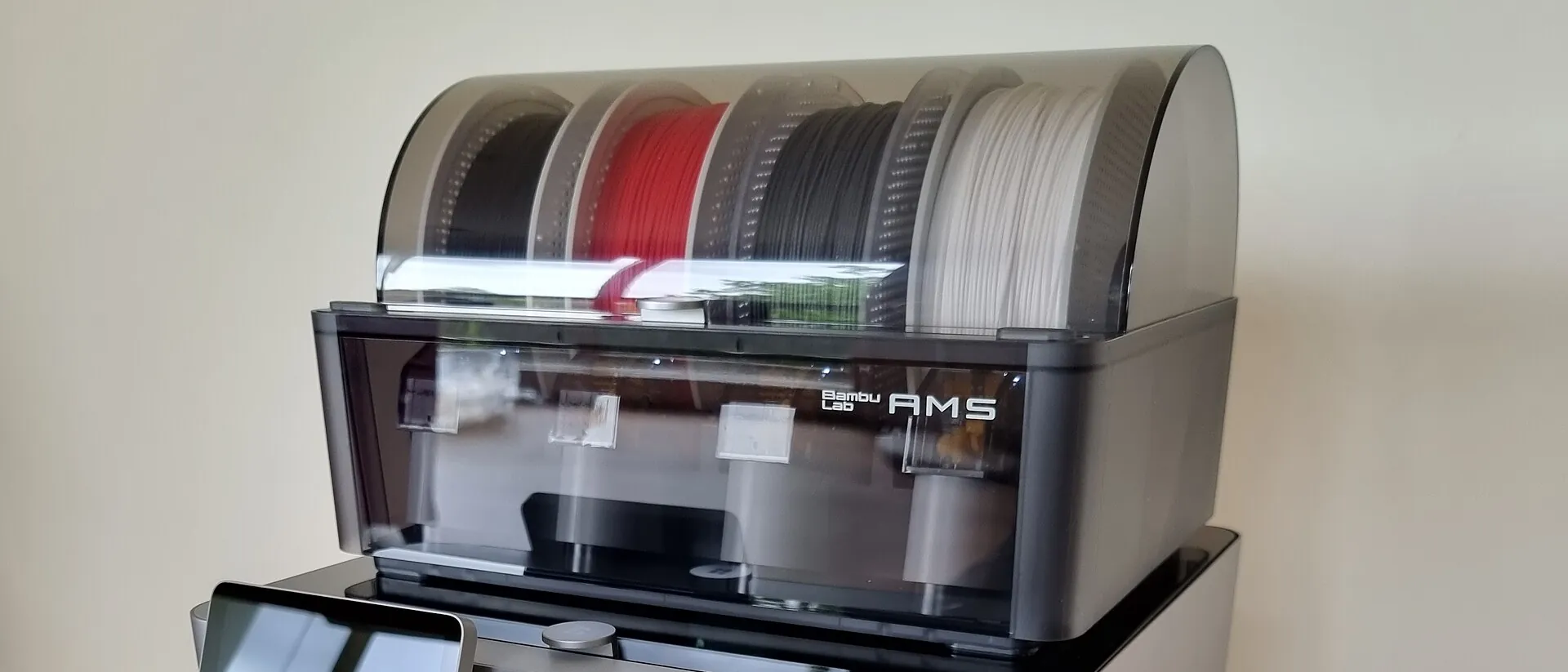
The AMS 2 Pro heats to 65 °C and the AMS HT to 85 °C, and Bambu Lab's own table sets the cycle by material. PLA runs at 45 °C for 12 hours in either unit. PETG runs at 65 °C for 12 hours in either. TPU gets 65 °C for 12 hours in the AMS 2 Pro, which Bambu Lab says may not dry it fully, or 75 °C for 18 hours in the AMS HT. ABS, ASA and PC run at 80 °C for 8 hours, the nylons at 85 °C for 12 hours and PVA at 85 °C for 18 hours, all in the AMS HT only, because the table lists them as not compatible with the AMS 2 Pro. Before a cycle hotter than 45 °C, take PLA and TPU out of the unit, and pull each spool's filament out of its inlet so the spool can rotate while it dries.
The rest of this page collects what Bambu Lab spreads across three wiki articles: the per material settings, which spools can share a cycle, the two drying modes, how to start a cycle from the printer or the app, which printers can power the heater, what happens when a print starts mid cycle, and the places where those articles contradict each other. The pages were read on 8 October 2026; the drying function article was last edited on 17 August 2026. For drying on other hardware, in an oven or on a heated bed, and for what moisture does to a print, see the general guide to drying 3D printer filament. Nanopack has no connection with Bambu Lab.
AMS 2 Pro and AMS HT drying settings by material
These are the AMS columns from Appendix I of Bambu Lab's filament drying guide, copied as published. Bambu filaments carry an RFID tag, and the unit fills in temperature and time from it, so the table matters most for third party spools and for checking what the RFID has chosen.
| Filament | AMS 2 Pro | AMS HT | Drying before use |
|---|---|---|---|
| PLA Basic, Matte, Silk, Aero, Galaxy, PLA-CF and GF | 45 °C, 12 h | 45 °C, 12 h | Recommended |
| PLA Wood | 45 °C, 12 h | 45 °C, 12 h | Required |
| Support for PLA, Support for PLA/PETG | 60 °C, 12 h | 60 °C, 12 h | Recommended |
| PETG, PETG-CF | 65 °C, 12 h | 65 °C, 12 h | Recommended |
| TPU 85A, 90A, 95A HF, TPU for AMS | 65 °C, 12 h (may not dry fully) | 75 °C, 18 h | Required |
| ABS, ASA, ASA Aero, ASA-CF, ABS-GF | Not compatible | 80 °C, 8 h | Recommended |
| Support for ABS | Not compatible | 80 °C, 4 h | Not required but recommended |
| PC | Not compatible | 80 °C, 8 h | Required |
| PET-CF, Support for PA/PET | Not compatible | 80 °C, 12 h | Required |
| PA6-CF and GF, PAHT-CF and GF | Not compatible | 85 °C, 12 h | Required |
| PVA | Not compatible | 85 °C, 18 h | Required |
| PPA-CF, PPS-CF | Not compatible | Not compatible | Required |
"Not compatible" in the AMS 2 Pro column means the unit cannot reach the temperature the material wants, since 65 °C is its ceiling. Bambu Lab's drying function article words it more loosely and says every filament type can be dried in either unit, with a note that engineering materials needing more than 65 °C dry better in the AMS HT. Bambu Lab's X1 and P1 instructions put it plainly: filaments that need more than 65 °C might not be completely dried in the AMS 2 Pro, and the printer shows a notification suggesting the AMS HT.
Bambu Lab also warns that PVA, PPS-CF and PPA-CF may still not dry fully at 85 °C, and its forced air oven figure for PPA-CF and PPS-CF is 100 °C to 140 °C for 8 to 12 hours, out of reach of either unit.
Which spools can stay in the unit during a cycle
Everything in the chamber sees the same air temperature. Bambu Lab's rule is that when you dry a higher temperature filament such as ABS or PETG, the cycle exceeds the softening point of PLA and TPU, so both must come out first or they soften and deform. Drying PLA is the safe direction: at 45 °C any other filament can stay in the unit.
Read against the table, PLA can stay in the unit only for a 45 °C cycle, since PETG at 65 °C, the support materials at 60 °C and TPU at 65 °C or 75 °C all run hotter. TPU sits oddly in the rules. Bambu Lab names it as a low softening material to remove when drying ABS or PETG, yet its own setting is the same 65 °C as PETG in the AMS 2 Pro and 75 °C in the AMS HT. That leaves TPU with a cycle of its own, and for the AMS 2 Pro the table points to the heated bed or the AMS HT instead.
When you open the drying page, the screen defaults to PLA settings if any PLA is loaded, and to PETG settings if there is no PLA but there is PETG. Choosing ABS prompts you to pull the PLA out.
Rotating or static drying
Both units offer two modes, and the choice depends on whether the filament is still threaded into the feeder.
| Rotating spool drying | Static drying | |
|---|---|---|
| Setup | Withdraw the filament from the feeding unit, stow the end on the spool, tick "Rotate spool while drying" | Leave the filament in the inlet |
| What happens | The spool turns 30° every 5 minutes so it heats evenly | The spool stays still and hot air circulates around it |
| Use for | Most filaments; Bambu Lab calls it the recommended mode with the best results | Not for PLA, PVA, Support for PLA/PETG or TPU |
The excluded materials soften at low temperature. Left still, their windings can stick together or deform as they expand. Separately, Bambu Lab's drying guide says the AMS will not dry while auto feeding is running, so that the feed gears do not deform warm filament.
Only the slots you have unthreaded rotate. A spool whose filament is still in its inlet stays static even when the box is ticked. The exception is H2D firmware 01.03.00.00 and later, which can dry PLA and TPU without rewinding or rotation. On other printers, and on older H2D firmware, those two still need the rotating mode.
Starting a drying cycle
From the printer screen
- Close the AMS lid. Bambu Lab's X1 and P1 instructions say the closed cover seals the chamber for drying.
- Open the printer's Drying & Humidity page and, with more than one AMS connected, pick the right unit.
- Confirm the filament type in each slot, especially any that show "?".
- Remove PLA and TPU if the cycle will run above 45 °C, and unthread the spools you want rotated.
- Choose the temperature and time, or accept what the RFID set, and tap Start. The AMS runs a self check and then counts down.
On an X1 Carbon the page is under the Filament section, through the AMS humidity icon, or under Settings as AMS Drying. On a P1 series printer a notification appears when the AMS is connected, and drying is started from it. The same page shows chamber humidity, temperature and time remaining while the cycle runs.
From Bambu Studio or Bambu Handy
On the Device page, tap Dry on the AMS you want, set the filament and time, check the slots and start or stop the cycle. Remote drying needs H2D 01.03.00.00, H2S 01.02.00.00, P2S 01.02.00.00, X2D 01.01.00.00 or A2L 01.01.00.00 firmware or later. Bambu Lab says other printers will get it in later updates.
On an X1 or P1 printer
The AMS 2 Pro works on X1 and P1 machines, with three extra conditions. The printer needs the firmware released at the end of April 2025, installed before the AMS is connected. The AMS connects through a filament buffer, or an AMS Hub for several units. And every AMS 2 Pro on these printers needs its own Bambu Lab switching adapter, rated 24 V 4 A, because the printer cannot power the heater. Without it the screen reports insufficient power and the power icon stays grey.
After the cycle
Let the unit cool for 5 to 10 minutes after a hot cycle, then check the filament for flattening or gear marks before loading it. Keep the vents on the bottom of the AMS 2 Pro clear while it dries; that is where the moisture leaves.
Power: which printers can run the heater
Whether drying can run at all depends on power, and the rules differ by printer and by unit.
| Setup | What drying needs |
|---|---|
| One AMS 2 Pro on an H2 series, P2S or X2D | Power from the printer over the 6 pin cable, no adapter |
| Several AMS 2 Pro units drying at once on those printers | One unit on 6 pin power; each additional unit needs its own adapter |
| AMS 2 Pro on an X1, P1 or A2L series printer | An adapter on every unit |
| AMS HT on any printer | Its own power cord; 6 pin power cannot run its heater |
Without an adapter, an H2 series printer cuts drying power to 86 % of normal to keep enough for printing. A P2S or X2D gives the AMS priority instead: while it dries on printer power, the printer cannot heat the bed or hot end, move its axes or load and unload filament. With an adapter or cord connected neither limit applies. On the drying page a grey power icon means no adapter, and a green one means the unit is on its own supply.
Drying while printing
On newer printers the AMS can keep drying while the printer feeds from it, but it lowers the temperature once the print starts so nothing softens inside the unit or gets crushed by the feed gears. The two figures Bambu Lab gives are 45 °C where PLA is involved and 55 °C where PETG is involved. The drying function article frames them as drying PETG while printing PLA at 45 °C and drying ABS while printing PETG at 55 °C. The filament drying guide frames them as drying PLA, or printing with PLA, at 45 °C and drying PETG while printing ABS, or printing with PETG, at 55 °C. Either way the cycle drops below its normal setting, and a spool that needs 65 °C or 80 °C will not get it during a print.
This needs H2D 01.03.00.00, H2S 01.02.00.00, P2S 01.02.00.00, X2D 01.01.00.00 or A2L 01.01.00.00 firmware. The P1S, P1P, X1C, A1 and A1 mini do not support it yet. One case works everywhere: feeding TPU out of the AMS HT's dedicated TPU outlet with drying switched on. Bambu Lab does not count that as simultaneous drying and printing, and it is available on every printer.
When the AMS 2 Pro will not reach 65 °C
The AMS 2 Pro reaches its 65 °C maximum only when the room is at 25 °C or warmer. Below that the unit loses heat to the room faster than it can make it up, and Bambu Lab says the lower temperature is expected and is not a product fault. Its advice is to dry in a room at normal temperature, or to insulate the unit in a cold one. The AMS HT has a 170 W heater and holds 85 °C in rooms from 10 °C to 25 °C.
Both units also open and close their air ports on their own during a cycle. The ports open once at the start as a self check, close while the chamber is below the target so the heat stays in, and open once it reaches the target so humid air can leave. With drying off they stay shut to keep room air out. Before feeding, if the chamber is hotter than the softening point of the loaded filament, a fan cools it first to avoid a jam.
Where Bambu Lab's pages disagree
The three articles were edited at different times and do not match in four places.
The first is PLA. The table says 45 °C for 12 hours. The X1 and P1 setup article gives PLA as 45 °C to 55 °C for 6 to 8 hours, and the company's forced air oven setting for PLA is 50 °C for 8 hours. Some users think 45 °C is too low for the AMS. One H2D owner drying PLA in an AMS 2 Pro without rotation reported on Bambu Lab's forum in October 2025 that the humidity reading stayed flat for a long time at 45 °C, while at 50 °C it rose first, as water came out of the spool, and then fell steadily. Another user asked in the same thread in August 2026 to be allowed to set 50 °C. It is one humidity sensor trace, and it points the same way as the oven figure.
The second is which filaments the AMS 2 Pro can dry: "Not compatible" for ABS, ASA, PC, PVA and the nylons in the table, "all filament types" in the drying function article. Both are describing the same 65 °C ceiling.
The third is the printing while drying temperatures, which the two articles attach to different pairs of materials, as set out above.
The fourth is the desiccant. The X1 and P1 setup article describes the AMS 2 Pro's silica gel as turning from yellow to purple when it is saturated, while the desiccant section of the drying guide describes yellow indicator beads turning green. Either way, a pack that has changed colour all through needs replacing or regenerating, and Bambu Lab's limit for baking its silica gel is 100 °C.
Frequently asked questions
What temperature does the AMS 2 Pro dry PLA at?
45 °C for 12 hours, the same as the AMS HT, according to Bambu Lab's drying table. Bambu Lab's X1 and P1 setup article gives a wider 45-55 °C for 6 to 8 hours, and its forced air oven setting for PLA is 50 °C for 8 hours.
Can the AMS 2 Pro dry ABS, ASA, PC or nylon?
Not to Bambu Lab's settings. Those materials need 80-85 °C and the AMS 2 Pro tops out at 65 °C, so the drying table lists them as not compatible with it. A cycle can still be run at 65 °C, but Bambu Lab says such filaments might not be completely dried and recommends the AMS HT.
How long does the AMS HT take to dry nylon?
12 hours at 85 °C for PA6-CF, PA6-GF, PAHT-CF and PAHT-GF in Bambu Lab's table. PVA takes 18 hours at 85 °C, and PC, ABS and ASA take 8 hours at 80 °C.
Do I have to take PLA out of the AMS before drying PETG?
Yes. Bambu Lab says that drying ABS or PETG takes the chamber past the softening point of PLA and TPU, so both must be removed or they may soften and deform. Drying PLA at 45 °C is the one cycle in which any other filament can stay in the unit.
Why can I not start drying on my X1 or P1 printer?
Check power and firmware first. Every AMS 2 Pro on an X1 or P1 needs its own Bambu Lab switching adapter, rated 24 V 4 A, and without it the screen reports insufficient power and the power icon stays grey. The printer also needs the firmware released at the end of April 2025, installed before the AMS is connected.
Can the AMS dry filament while the printer is printing?
On H2D, H2S, P2S, X2D and A2L printers with recent firmware it can, but the unit lowers the drying temperature once the print starts, to 45 °C where PLA is involved and 55 °C where PETG is involved. The P1S, P1P, X1C, A1 and A1 mini do not support it yet. Feeding TPU from the AMS HT's TPU outlet with drying on works on every printer.
Why does my AMS 2 Pro not reach 65 °C?
A cold room is the cause Bambu Lab names. It says the AMS 2 Pro reaches its 65 °C maximum only when the ambient temperature is at least 25 °C, and that a lower chamber temperature in a cooler room is not a product fault. The AMS HT, with a 170 W heater, holds 85 °C in rooms from 10 °C to 25 °C.